Turn future demand into smarter purchase decisions.
A forward-looking Excel planning tool that connects forecast, current inventory, open supply, lead time and target coverage to show what to buy, when to buy it and where service risk is building.
Demand-driven purchase planning — not a static reorder-point trigger.
The planner uses the latest forward demand plan as the reference. Each week's target inventory moves with future demand, while existing inventory and open purchase orders are projected against that target.
As demand, supply or the buyer's decision changes, future purchase requirements change with it. The objective is to protect service without blindly building inventory.
Automate the calculation. Keep the decision with the planner.
The engine recommends what is needed and when. The buyer can confirm, reduce, increase, move or consolidate orders according to operational reality.
The buyer sees the recommendation — and keeps control of the final PO.
The screenshots below are cropped directly from the actual commercial Excel product. No recreated interface is used as product proof.
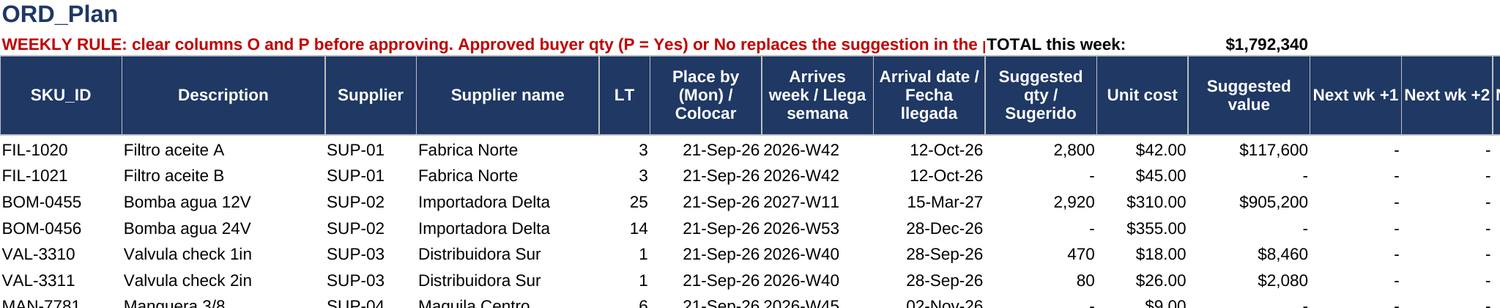
ORD_Plan — Suggested → Buyer Decision → Final
The original recommendation remains visible while the buyer enters the quantity to approve. Once approved, the final quantity becomes the working plan and the downstream projection recalculates.
See the weekly calculation behind every recommendation.
DETAIL_Grid exposes the planning logic SKU by SKU, week by week.

DETAIL_Grid — weekly demand, inventory, target and order timing
For each SKU, the grid shows future demand, scheduled supply, target inventory, projected inventory, planned receipts and the release timing generated from lead time. It also makes the frozen zone visible: when a shortage sits inside lead time, a new PO is already too late and the action shifts to expediting or allocation.
Turn the plan into a focused weekly review.
The planning engine generates the recommendation. The dashboard helps teams prioritize risk, understand what changed and focus on the SKUs that require action.
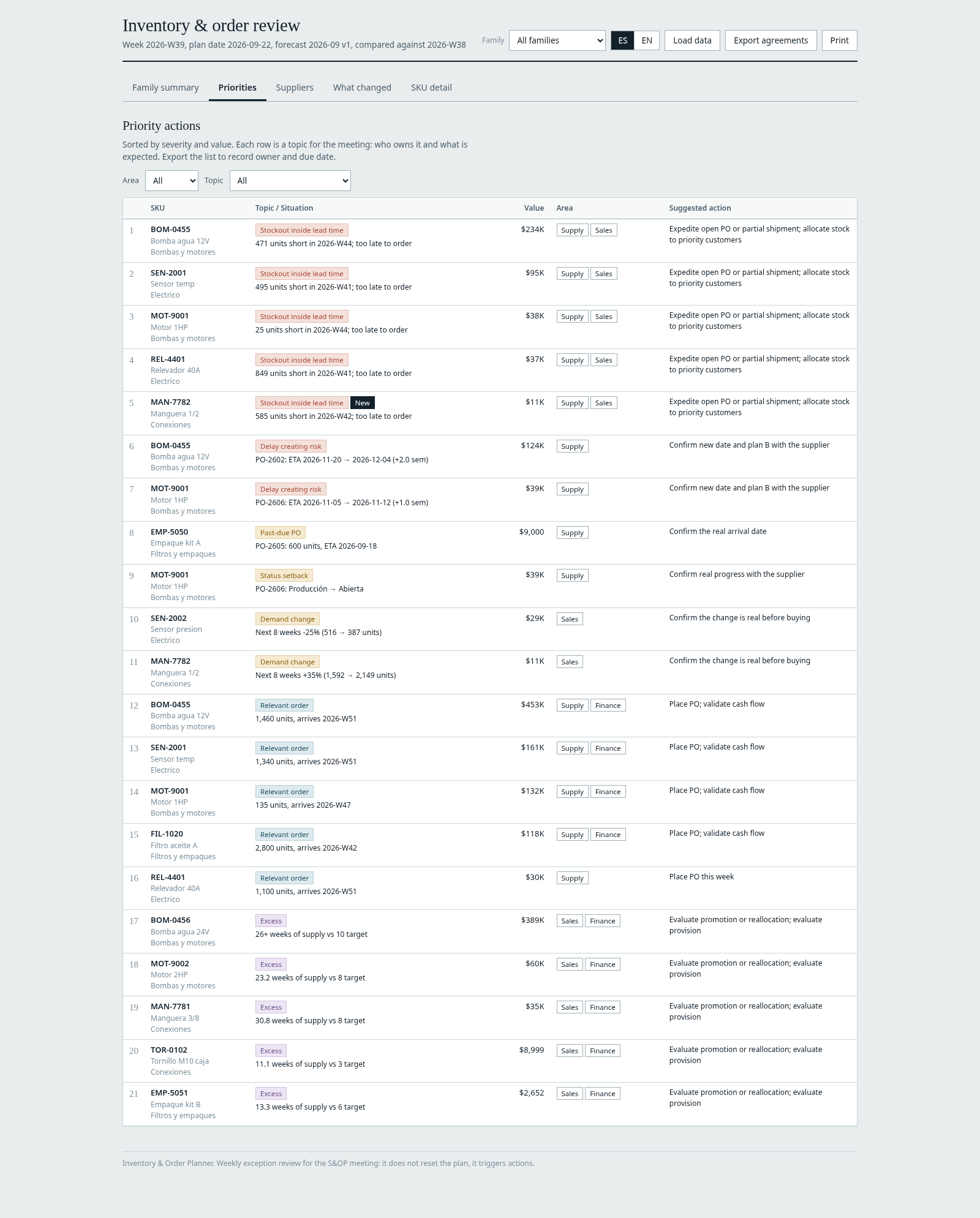
Priorities Dashboard
Highlights the most relevant issues by severity, value, responsible area and suggested action—turning the weekly review into a clear action agenda.
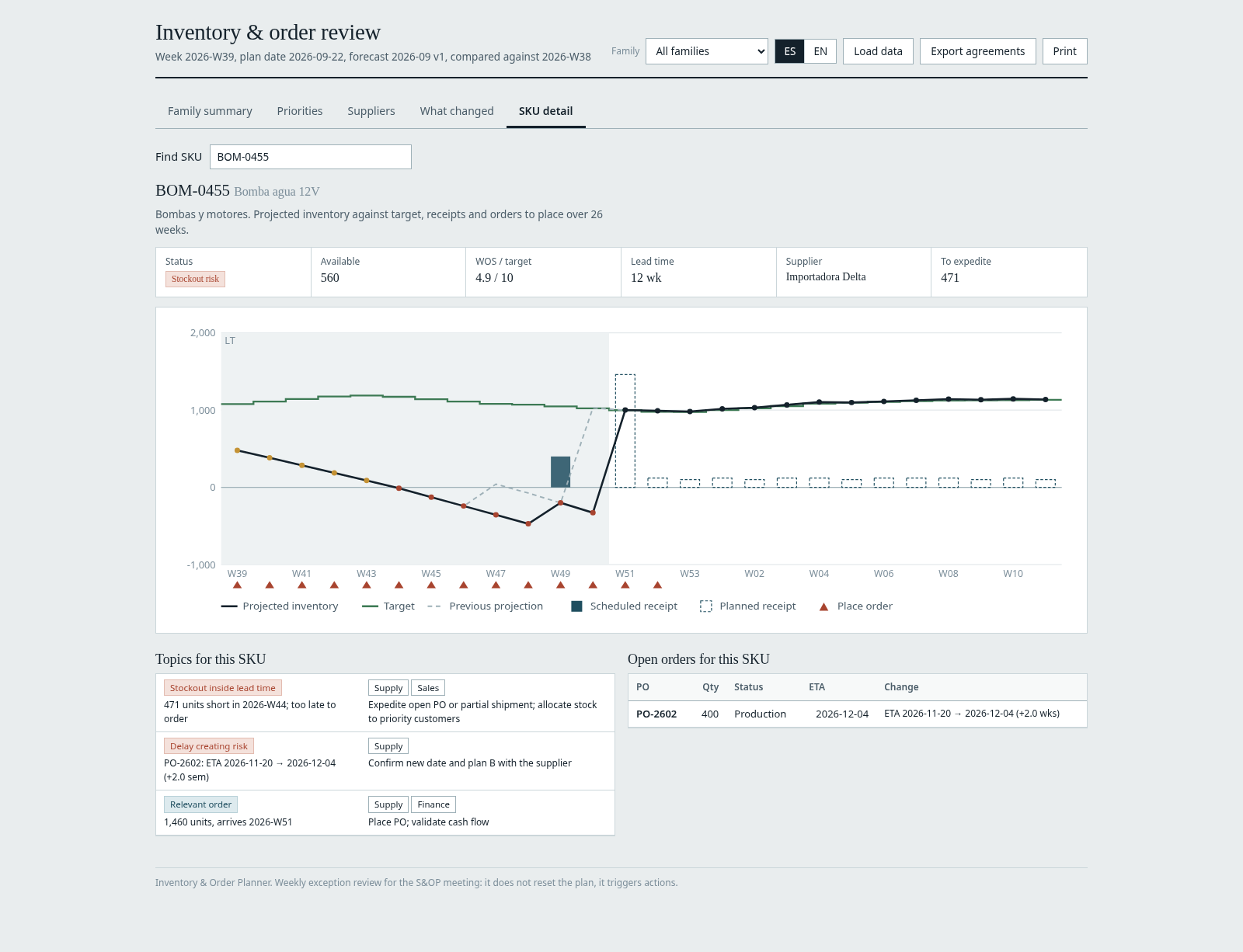
SKU Detail Dashboard
Drills into the item-level signal with projected inventory, target coverage, scheduled and planned receipts, purchase timing and open-order context.
Focus attention where action is actually required.
The companion dashboard turns the plan into a weekly review by exception.
Stockout Risk
Projected inventory falls below zero inside lead time. Expedite, use partial shipments or allocate available stock.
Order Now
A purchase recommendation is due for release in the current week.
Below Target
Forward coverage is below policy, but no order is due this week. Review lead time, MOQ or next release date.
Excess
Coverage is materially above target. Review future buys, demand assumptions, reallocation or promotion options.
What Changed
Compare this week's run with the previous one and separate demand, supply and actual-start drivers.
Supplier Review
Track open POs, delayed ETAs, past-due orders, status setbacks and purchase value by supplier.
You do not need the MGV76 Forecasting Toolkit.
The planner accepts any forward-looking monthly forecast, budget or sales plan. If your forecast is arranged as SKUs in rows and months in columns, the included Forecast_Converter.xlsx transforms it into the planner format.
If you already use the MGV76 Demand Planning Kit, its export can be pasted directly into the planner.
Integrated, but not dependent.
Demand Planning and Inventory & Purchase Planning work together, but each product can be used independently.
One complete Inventory & Purchase Planning package.
Inventory & Purchase Planning
Forward inventory planning, suggested purchase orders, buyer approval, dynamic replanning and exception dashboard.
One-time payment securely processed by Lemon Squeezy.
Designed for practical SKU-level planning.
Up to 500 SKUs
With up to 50 suppliers and 2,000 open purchase orders.
26-week horizon
Forward weekly inventory and purchasing plan using a 12-month forecast.
SKU policy
Target WOS, lead time, MOQ and order multiple can be defined by SKU.
Consolidated inventory
Multiple locations for the same SKU are added into one consolidated position.
Not MRP
The product does not include BOM explosion, multi-level MRP or plant-capacity constraints.
Planner-controlled
The calculation supports the decision. The buyer remains responsible for the final purchase action.